Ready to invoice: billing time and expenses
Everything billable that isn’t on an invoice yet, in one list: tick what to bill and make draft invoices.
Written By Julia M.
Overview
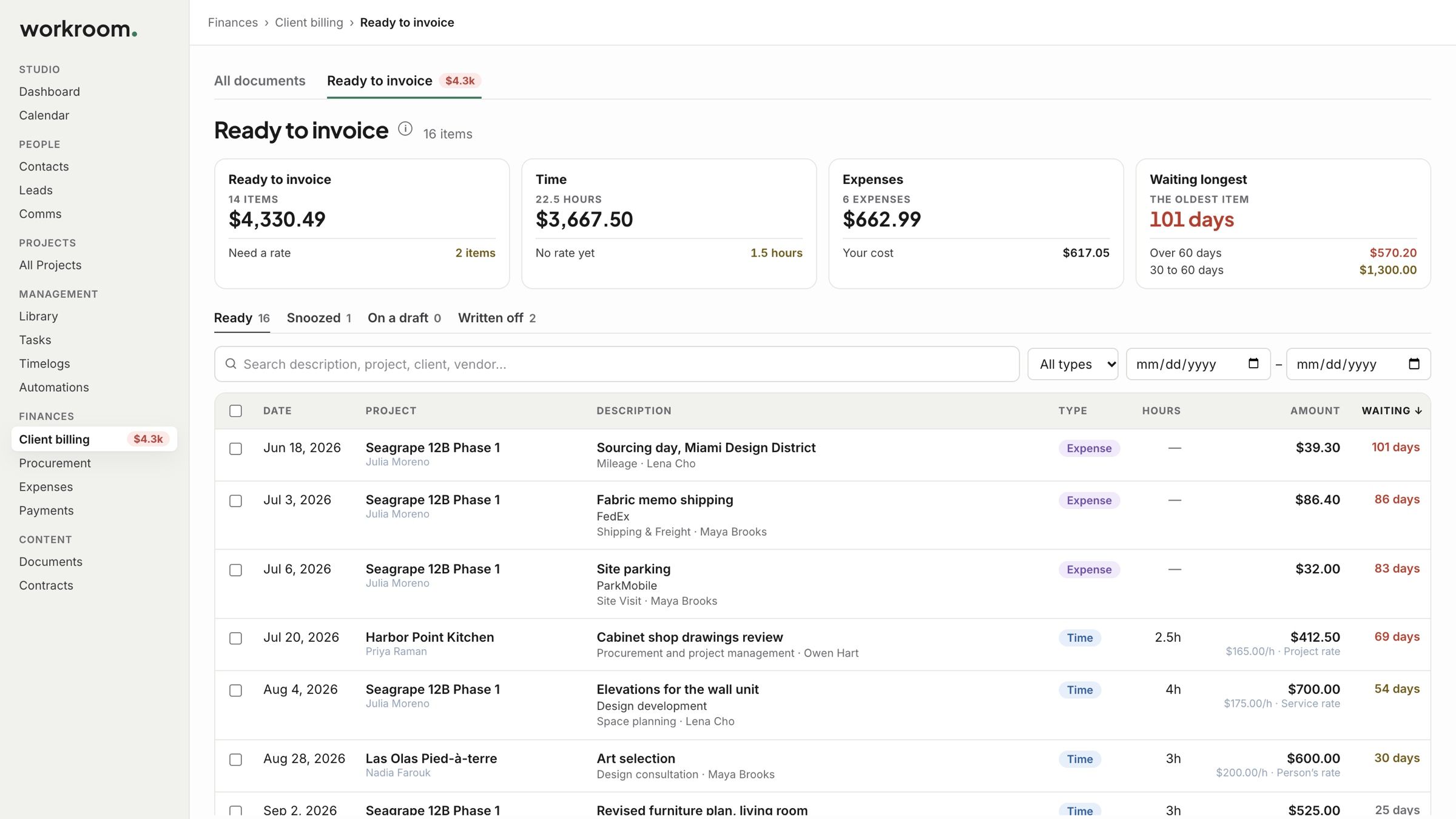
Finances › Client billing › Ready to invoice gathers everything billable that isn’t on an invoice yet: your team’s time, and signed-off expenses your client pays back.
Watch it: the Finances lesson in Campus, step 5, “Time and expenses”, chapter 1, “Ready to invoice” (starts at 0:09).
What you see
Tiles for what is ready to invoice, the time, the expenses, and what has been Waiting longest.
Views for Ready, Snoozed, On a draft and Written off, with search and filters for type and dates.
The badge beside Client billing in the side menu shows the total, and turns red when something has waited more than sixty days.
Bill it
Tick what you want to bill. The bar shows how many items and their total.
Click Generate draft invoices to make one draft for each project, or Add to existing draft to put them on a draft you already have.
Open the draft, check it, and send it.

Good to know
An item with no rate can’t be billed until it has one. See Rates, snoozing and writing off.
Items on a draft move to the On a draft view. Take one off the draft and it comes back to Ready.
Related articles
Was this helpful?
Still need help? Ask the team