Everything WorkPay
The documents that get a WorkPay application approved in one pass, and where to send them.
Written By Timothy Murenzi
Overview
Every WorkPay application is checked three ways: the people who own the business, the business itself, and the money it moves. An application is held (“pended”) when one of those checks can’t be finished from what was sent. Send the full packet below up front, and underwriting can finish in one pass.
Watch it: the Finances lesson in Campus, step 4, “Invoice and get paid”, chapter 3, “Paid online” (starts at 0:40).
The packet
Government ID for every owner and the control person
A clear color photo of the front and back of a driver’s license or state ID for each person owning 25% or more, plus the person who controls the business. This confirms who owns the business and is used for watchlist screening.
Articles of Incorporation or Organization
The state-filed formation document. It proves the business exists and confirms its exact legal name, entity type and state.
IRS EIN confirmation
Your SS-4 confirmation, CP 575 or 147C letter showing the EIN and legal name. This prevents EIN and name mismatches and keeps 1099-K reporting right.
Four months of business bank statements
The four most recent monthly statements for the operating account, all pages. They show cash flow, and that the payout account belongs to the business. This is what supports higher volume requests.
Earlier processing statements, if you have them
Two or three recent statements from a card processor you used before. They are the strongest proof of volume, ticket size and chargeback history.
Where it goes
Upload documents in the Banking and Documents step of the application (Settings › Studio › Integrations and apps › WorkPay › Apply for WorkPay).
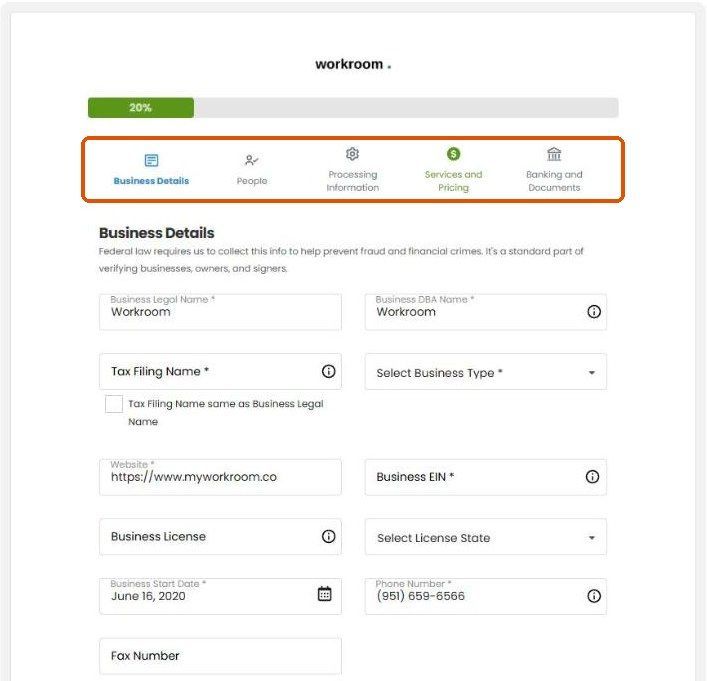
The best path to approval without a hold
Check that the legal name, address, ownership percentages and EIN read the same on the ID, formation document, EIN letter and bank statements.
Have the person with controlling authority fill in the application.
Send any document that can’t be uploaded to the underwriting email you are given, not through chat.
Related articles
Was this helpful?
Still need help? Ask the team