November 5, 2026 Update
A brand-new project Overview
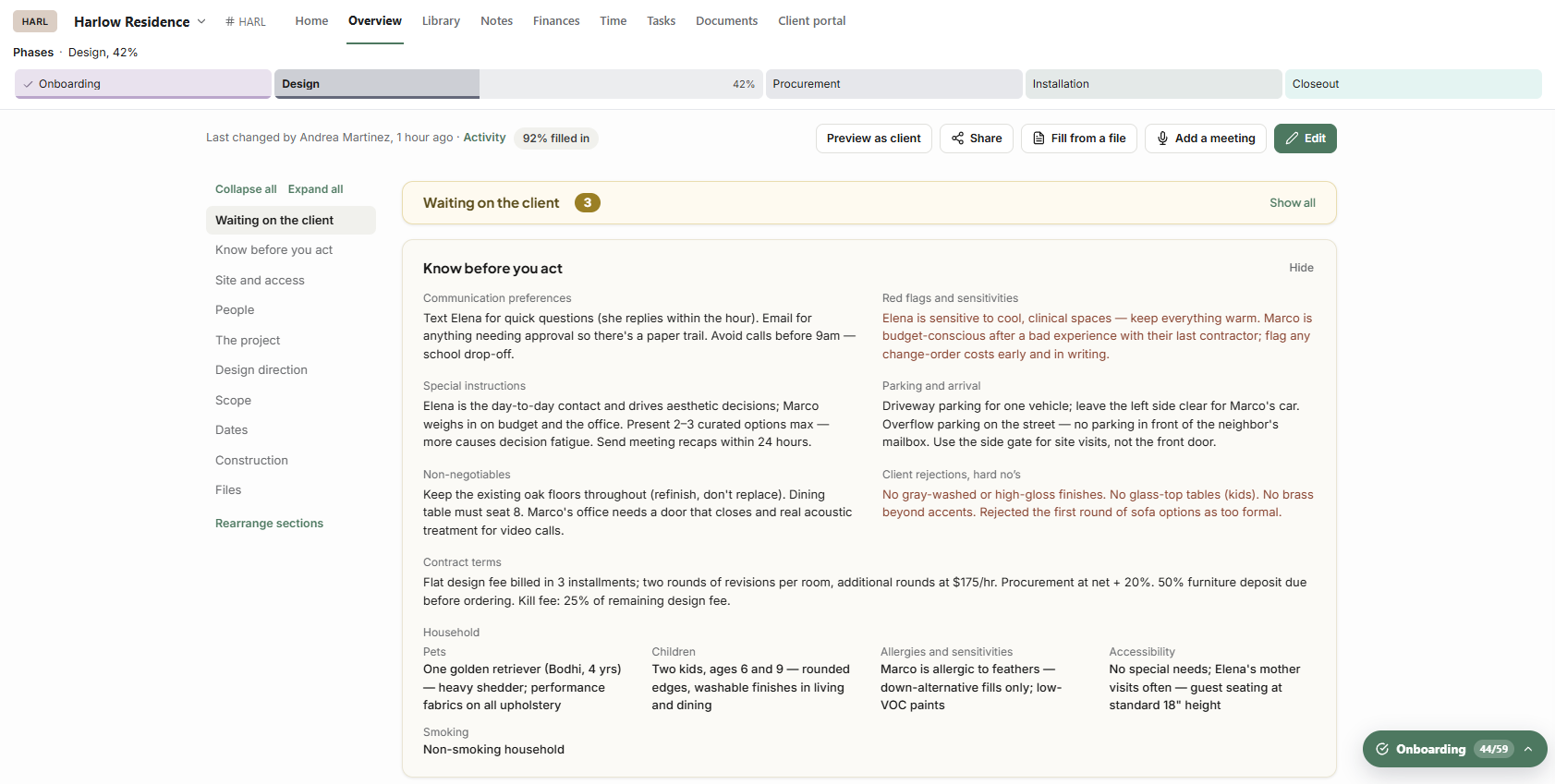
The Overview tab has been rebuilt from the ground up as one place for everything about a project.
Sections for the whole project: people, design direction, where we started, scope and dates, files, site and access, household, construction, and what you're waiting on from the client.
Arrange it your way: reorder sections, add your own, collapse or expand them all, and jump to any section from the side list. The side list and the buttons along the top now stay put as you scroll, so Edit is always within reach. Editing keeps you on the section you were reading.
Design direction:
A mood board, palette and finishes.
A built-in library of 600+ real material photos: marble, tile, wood, fabric, metal, plumbing finishes and more.
A color library with paint colors by brand and color family, plus your own custom colors.
You can add several finishes at once.
Fill from a file or a meeting: drop in a contract, intake form or proposal, or add a meeting transcript or recording. Walter suggests what to fill in, and you review each suggestion before it's saved.
Files: key files at a glance, smart search (ask Walter), and drag-and-drop uploads.
Waiting on the client: see what's outstanding, then nudge, snooze or dismiss each item.
Deliverables and milestones link both ways with Tasks and the Calendar, as do permits and trades.
Share it: download a polished PDF of the Overview, or email it, and choose exactly which sections go in.
Your client sees it too:
Choose which sections show in the client portal, person by person.
Use "Preview as client" to see exactly what they'll see.
Access codes stay with your studio.
Library
Group or filter by status: drag a product between status groups to change its status.
Move a product to another project, or back to the Library, by clicking its project tag.
Mark a finish close-up in a product's gallery, for mood boards.
Changing a sub-item's room now asks whether to move it out on its own.
Contracts
Titled sections inside numbered lists, with numbering that continues across them, in the editor and in the signed PDF.
Section templates edited in Settings now use the same forms as the contract editor, and apply correctly.
Finances
Edit an estimate, invoice or purchase order number by clicking the big number at the top. Numbers lock once a document is paid, voided or canceled.
Non-billable time now costs $0 everywhere and stays out of Ready to invoice.
Purchase orders:
add any product's sub-items as their own lines;
detach any sub-item;
the same vendor typed with different capitals or spacing is now treated as one vendor.
Calendar
Deleting or archiving a meeting now removes it from your connected Google or Outlook calendar.
Changes sync to connected calendars right away.
Calendar events no longer show up as tasks in task lists, dashboards or reminders.
Fixed
Library images:
images uploaded several at once no longer disappear;
uploading an image no longer bumps your main product image out of place.
Contracts:
client-fill fields now stay exactly where you placed them, on the signing page and in the signed PDF;
placeholder section names ("Custom section") no longer show to clients;
your logo no longer appears twice.
Finances:
Taxes: creating a PO from the Library or adding PO lines now uses the vendor's tax, not the client's.
Editor: Edit product in the finance editor no longer crashes.
Sending:
the invoice send window scrolls with long messages;
a PDF that can't be attached now says so, instead of failing silently.
Estimate deposits: a $0 deposit no longer asks the client for payment at signing.
Lines: service and time lines no longer show blank picture squares.
Viewed time: the time a document was viewed now shows in your studio's time zone.
RFQ reminders no longer send twice.
Projects: changing the status of a project that had no status no longer fails.
Calendar: two meetings can now share a name.
Dashboard and lists:
project cards no longer stretch one team photo across every face;
contact, vendor and team list columns line up again.
Task notices: people added to a task are now notified from everywhere a task can be assigned.
Walter: a two-decimal discount percentage is no longer misread as an amount.